
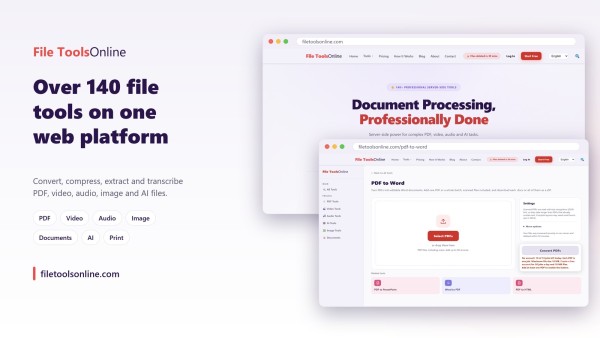
File Tools Online has launched a web platform at filetoolsonline.com with more than 140 server-side tools that convert PDF to Word, compress PDF and video files, extract tables to Excel and transcribe audio and video recordings to text.
Suffern, New York, United States, 24th Nov 2026 – File Tools Online has launched a web-based file processing platform that brings more than 140 online file tools for PDF, image, video, audio, document and AI tasks together on a single site. The platform allows students, office teams, small businesses, content creators and print professionals to convert, compress, edit, extract and transcribe files from a web browser without installing desktop software. All processing runs on the company’s own servers rather than on the user’s device, so older laptops, tablets and phones can handle large files and AI workloads that would normally call for a powerful computer. The site is available in English and French.
A Growing Need for Server-Side File Tools
Everyday file work is often spread across several separate apps. A typical week can involve converting a PDF to Word to edit a contract, compressing a PDF so it fits under an email attachment limit, turning iPhone HEIC photos into JPG files and copying a table from a PDF report into a spreadsheet. Tools that run entirely inside a browser tab are limited by the memory and processing power of the device, which makes scanned documents, long videos and AI transcription harder to handle. File Tools Online sends each task to a private server instead, where established open-source engines process the file and return a finished result for download.
PDF and Document Tools Built on Proven Engines
PDF tools make up the largest part of the library. The PDF to Word converter turns PDF files into editable Word documents, while the Word to PDF tool uses LibreOffice to keep layouts, tables, headers and fonts in place. The PDF to Excel tool uses Camelot, an open-source table extraction library that tries several detection methods to recover tables from reports, invoices and statements. A PDF compressor built on Ghostscript offers three quality levels for email, web and print, and a PDF OCR tool uses Tesseract to add a searchable text layer to scanned pages without changing how they look. Further tools merge, split, rotate, crop and watermark PDF files, and a batch converter turns a ZIP archive of Word, Excel and PowerPoint files into PDF documents in a single job.
AI Transcription, Subtitles and Image Tools
The platform’s AI tools run open-source models on the company’s servers. The AI audio to text transcription tool uses OpenAI Whisper to turn speech in audio and video files into written text, with automatic language detection and results delivered as plain text, a timestamped transcript, a Word document or an SRT subtitle file. The same Whisper engine powers automatic video subtitles, which create SRT subtitle files and can burn captions directly into a video, as well as a meeting tool that turns a recorded meeting into written notes. For images, an AI upscaler built on Real-ESRGAN enlarges small or blurry pictures to four times their original resolution, and a background remover based on REMBG cuts subjects out into transparent PNG files. An invoice extractor reads invoice images and PDF files and pulls vendor names, amounts and dates into a spreadsheet.
Video, Audio and Image Conversion
Video and audio tasks run on FFmpeg, the widely used open-source media framework. Users can compress video files, convert video to MP4, trim clips, turn a video into an animated GIF, extract audio as an MP3 file and reduce background noise in audio recordings. Image tools cover compression, resizing, cropping and format conversion, including HEIC to JPG conversion for iPhone photos and PNG to SVG vector tracing for logos and graphics.
Print Preparation and Office Tools
For designers and print shops, File Tools Online includes an RGB to CMYK converter that produces TIFF or PDF files for commercial printing, a print-ready checker that reports on fonts, resolution, color and transparency, and a booklet creator that reorders pages for saddle-stitch printing. For offices, a mail merge tool creates a personalized PDF for each row of a spreadsheet, which helps teams produce certificates, letters or invoices in bulk. The site lists every tool by category in a single tool directory.
How the Platform Handles Uploaded Files
Every task follows the same three steps: a user uploads a file, chooses a tool and downloads the result. Uploads travel over HTTPS encryption, and according to the company, files are permanently deleted from its servers within 30 minutes of processing, whether or not the result has been downloaded. The company also states that it does not store, read or share uploaded files and that no person views their contents. Payments for paid plans are processed by Stripe.
Plans and Availability
File Tools Online is available now. Visitors can run up to 10 jobs per day without an account, and a free account raises the allowance to 50 jobs per day with a 10 MB file size limit and no credit card required. Each processed file counts as one job, and free allowances reset daily at midnight UTC. Three paid monthly plans remove the daily job limit. The Starter plan costs $6.99 per month with a 10 MB file size limit and email support, the Business plan costs $19.99 per month with a 15 MB limit and priority email support, and the Agency plan costs $39.99 per month with a 25 MB limit and dedicated email support. Paid plans can be cancelled at any time from the account dashboard.
About File Tools Online
File Tools Online (filetoolsonline.com) is a web-based platform that offers more than 140 server-side tools for PDF, image, video, audio, document and AI file processing. Its tools are built on open-source engines including OpenAI Whisper, FFmpeg, LibreOffice, Ghostscript, Tesseract, Camelot and Real-ESRGAN. The platform serves students, office workers, small businesses, content creators, designers and print shops, and deletes uploaded files within 30 minutes of processing.
Media Contact
Organization: File Tools Online
Contact Person: Michael Chierchio
Website: https://filetoolsonline.com/
Email: Send Email
Contact Number: +19172252555
Address: 400 Rella Blvd
City: Suffern
State: New York
Country: United States
Release id: 51061
View source version on King Newswire:
File Tools Online Launches Over 140 Online Tools to Convert PDF, Compress Video and Transcribe Audio

Disclaimer: The views, suggestions, and opinions expressed here are the sole responsibility of the experts. No Biz Economics journalist was involved in the writing and production of this article.
